Monday, 10 September 2012
Visual Arts Websites
Eliza and I have finished our websites for Kailey, Katie and Chiara. I resized all four of Chiara's images and also 2 of Kailey's images. Eliza resized all four of Katies and 2 of Kailey's as well we did this using microsoft office picture manager. On Kailey's website I linked the images to the pages and put them in to order and uploaded the larger images on the pages. Eliza found a nice template that suited the website and she applied it also changing the font. On Katies website Eliza setup the template and placed the thumbnails while I made the other pages and applied the larger images. Eliza and I worked together through out all of the websites. We got Angel's website which we did with in the lesson of receiving it.

Monday, 13 August 2012
QR codes and multimedia
What are QR Codes?
(QR Codes) Quick-Response codes are mobile barcodes that allow barcode-reading software in a mobile phone camera to act as a scanner. They can be placed in realworld settings & scanned with the phone camera and decoded.What can QR codes be used for be used for?
To promote products and provide information on a particular subject or business.Provide some examples of how they are being used in marketing and education.
- business cards
- catalogues
- product packaging
- t-shirts
- menus
- luggage tags
- real estate signs information on the property
- scavenger hunts
- fruits and vegetables to show where they were grown
- magazine and newspaper
What hardware (device) and software (apps or program) do you need to scan a QR code?
You need a smartphone and apps such as Google goggles or scan.What hardware and software do you need to create a Qr code?
http://www.qrstuff.com/ this link is to help you create your QR code it is preferable that you use a computer but any for of QR generator.
Create a QR code.

This QR code goes to my One Direction website.
Tuesday, 26 June 2012
Problems that were incountred
Eliza and I encountered a problem with file types and movie maker the cameras files would not load to movie maker and neither would Elizas voice memos so we had to do a file type converstion so we could use movie maker.
Tuesday, 12 June 2012
Synopsis
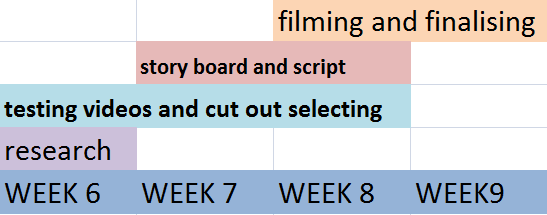
We are creating an educational video on our topic "What are Smartphone Apps and How to Install Them". Sub topics contained in our video include: What is the internet? (3G and wifi), Different types of apps (games, educational), Easy to follow steps on how to make an Apple ID or Google Account for app download. Our target audience is year9 students who will need this information to be able to use their smartphones to its full potential of a games centre and a social network. Our video contains cutouts of smartphones (iphone4 and android), apps (facebook,youtube, weather, safari) and app store for iphone or play store for android.
Thursday, 10 May 2012
Subscribe to:
Posts (Atom)